
Amazon SEO in 2026: how Amazon search works and what you control
Amazon SEO in 2026: how Amazon search matches and ranks products, where keywords go, what changed with 75-character titles and Rufus, and a checklist.
By Vlad Bazarov · Updated 13 October 2026 · 11 min readAmazon SEO is the work of getting a product into Amazon's search results for the searches its buyers type, and as high in them as it can go. It is worth the effort because search is where Amazon sells: the company's own search team has written that Amazon Search powers the majority of the store's sales.
Amazon does not publish its ranking formula, and a guide that lists exact weights is guessing. What is public is enough to work with: Amazon's guidance for sellers, the research its search scientists have published, and the listing rules that changed in 2026. This guide covers how the search works, where the keywords go, the half of ranking that is not text, the tools, and a checklist.
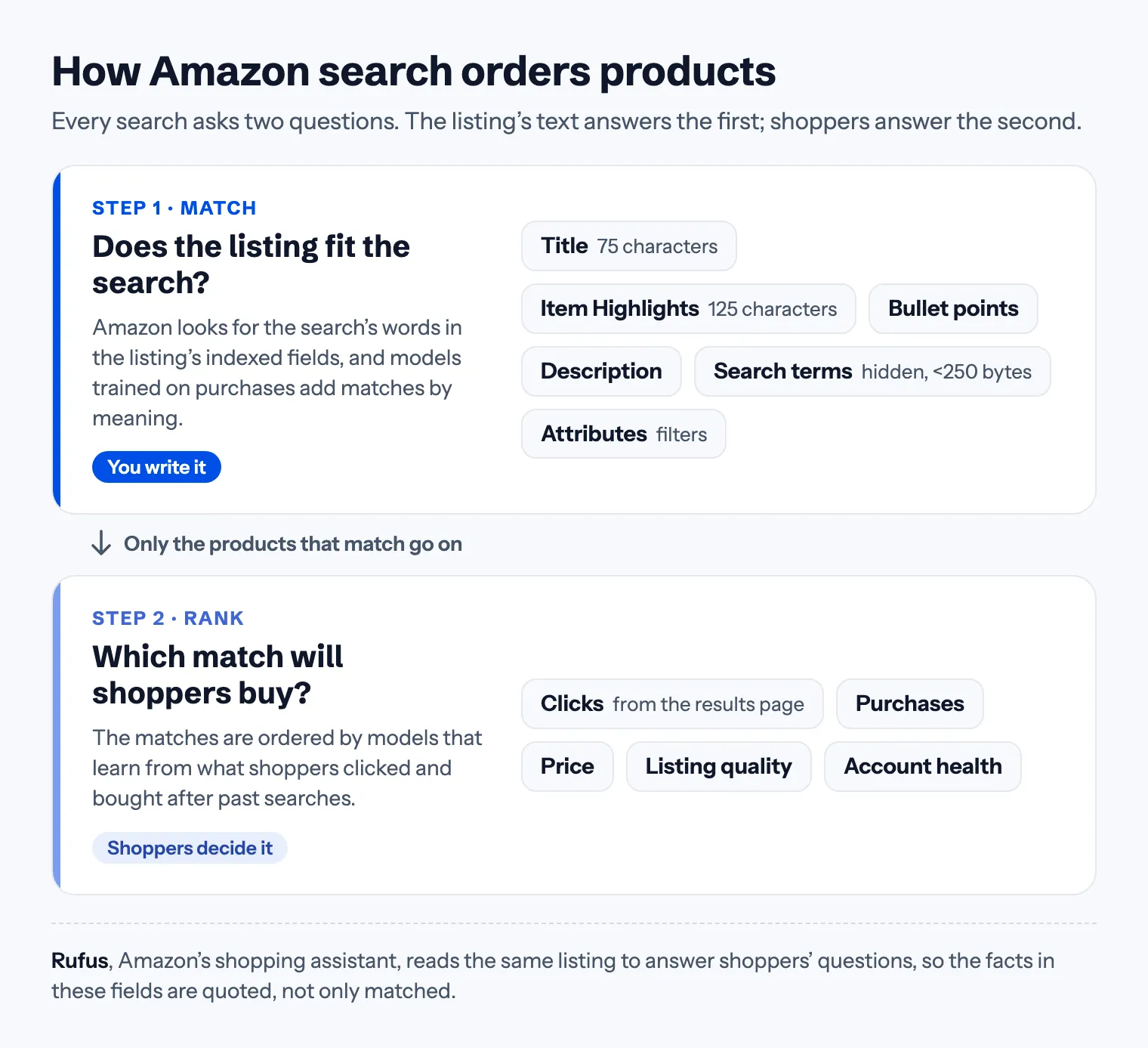
How Amazon search works: match, then rank
Every search is answered in two steps.
1. Match. Amazon first collects the products that fit the search. Its researchers describe a word-matching engine that retrieves the products containing the words of the query, and a neural model trained on purchases and clicks that adds the products matching its meaning. The second model exists because word matching alone misses women for woman, synonyms and misspelled searches. A product whose indexed fields hold neither the words of a search nor their meaning is not in the results for it, however well it sells.
2. Rank. The matches are then put in order. Amazon's search team has described machine-learned ranking models, built for categories, that replaced the hand-tuned formulas of the early years, and its published research trains search models on what shoppers clicked and bought after past searches. In its own SEO guide for sellers, Amazon adds that listing quality and account health can contribute to search rankings, and that a competitive price can improve them.
| Step | The question | What decides it | What you control |
|---|---|---|---|
| Match | Does the listing fit the search? | The words and facts in the indexed fields | Title, Item Highlights, bullets, description, search terms, attributes |
| Rank | Which match will shoppers buy? | Clicks, purchases, price, listing quality, account health | Main image, price, stock, the detail page |
Text gets a product into the race; shoppers decide where it finishes. A listing with perfect keywords and no sales sits below one that converts. A listing that converts but lacks the words never shows up for the searches it would win.
A9, A10 and other names
A9 was the name of Amazon's search and advertising technology subsidiary, founded in 2003. Amazon retired the A9.com site in 2019. "A10" is a name sellers coined for the changes since; Amazon does not use it. The names change nothing in the work: a listing still has to match, and then it has to sell.
What is different in 2026
Four changes since 2024 shape Amazon SEO now:
- Titles fit in 75 characters. Since July 27, 2026 titles in every category except media must fit in 75 characters, spaces included. A title still over the limit gets an AI-written replacement: the brand owner has 14 days to edit or approve it, and if nobody acts, Amazon's version goes live. The most valuable field holds fewer words, so choosing them is now the main title decision. See the 75-character title rule.
- Item Highlights adds 125 characters. A new line shown with the title and indexed for search, for the materials, sizes, compatibility and uses that no longer fit in the title. See Item Highlights explained.
- Rufus reads the listing. Amazon's shopping assistant answers shoppers' questions from listings, reviews and Q&A, and recommends products in its answers. A listing that states facts (material, fit, capacity, what it works with) can be quoted; a list of keywords cannot. See how Rufus reads your listing.
- Search reads needs, not only words. In 2024 Amazon's researchers described COSMO, a system that learns commonsense links from what shoppers search for and buy, and feeds them into search and recommendations. Their example: searches for shoes for pregnant women, and the purchases that followed, taught it that pregnant shoppers need slip-resistant shoes. A listing that says who the product is for and which problem it solves gives such a system something to connect.
Where the keywords go
Amazon indexes the text fields of a listing together, so a word that is already in the title gains nothing from being repeated in the search terms. Each field has its own job, and the keywords follow the jobs:
| Field | Limit | Shown to shoppers | Its job |
|---|---|---|---|
| Title | 75 characters | Yes | What the product is: brand, product type with the main keyword, the key filter |
| Item Highlights | 125 characters | Yes, with the title | Why to choose it: materials, sizes, compatibility, uses |
| Bullet points | 10–255 characters each | Yes | One shopper question per bullet, answered with a checkable fact |
| Description | 2,000 characters | Where A+ Content is not shown | The routine, the fit, the caveats, what is in the box |
| Search terms | under 250 bytes | No | Synonyms and searches the visible copy does not cover |
| Attributes | one valid value per field | In filters and comparison tables | Material, size, count, compatibility: the facts filters and Rufus read |
Three habits cover most of the field work:
- The main search phrase goes in the title, in its natural form, right after the brand. The title rule shows how to fit it into 75 characters.
- Every field carries different words. The bullets explain, the description adds what the bullets could not hold, and the search terms field takes the synonyms that fit nowhere visible. Bullet point rules and product description rules cover the two longest fields.
- Attributes take Amazon's own values. A product with an empty material attribute does not appear when a shopper filters by material, and a free-text value that matches nothing on Amazon's list is ignored. See required attributes.
All the limits are in one table in Amazon listing character limits.
Finding the words shoppers use
Keyword research for Amazon starts from what buyers actually type, and Amazon itself is the best source:
- The search box. Type the main phrase into Amazon's search and read the suggestions; they come from what shoppers search.
- Search Query Performance in Brand Analytics lists the searches that led shoppers to your products, with the impressions, clicks, cart adds and purchases of each.
- Top Search Terms in Brand Analytics ranks searches by how often they are made and shows the products shoppers clicked for them.
- Product Opportunity Explorer in Seller Central shows search volume and demand for a niche.
- The Sponsored Products search term report, if you advertise, lists the searches that brought clicks and sales.
- The top listings in your category show the words that already sell: read their titles and highlights.
Then sort the list. The main phrase goes into the title, the next most valuable ones into Item Highlights and the bullets, and whatever is left that the copy does not already contain goes into the search terms. Amazon keyword research walks through the method step by step, with a planner you can paste your own list into.
The half of ranking that is not text
Ranking follows what shoppers do, so whatever makes them click and buy is part of Amazon SEO:
- The main image is what a shopper sees in the results, next to the title and the price. A clear product on white, filling the frame, earns the click. See main image requirements.
- The price. Amazon's own guidance says a competitive price can improve ranking, and shoppers compare prices on the results page before they click.
- Reviews and rating. The stars show in the results, and reviews are one of the sources Rufus quotes. Amazon Vine is Amazon's programme for getting reviews of new products, and the Request a Review button in Seller Central asks a buyer in Amazon's own words. Buying reviews, or offering a refund, discount or gift in return for one, breaks Amazon's rules.
- Stock. A product that is out of stock cannot be bought, so it collects no sales while it is out, and sales are what the ranking learns from.
- The detail page. The other images, the bullets and A+ Content decide whether a click becomes a purchase. Brand owners can test two versions of a title, an image or A+ Content against each other with Manage Your Experiments.
- Advertising. Sponsored Products put a product into the results as an ad. Amazon does not document a direct effect of ads on organic rank; whatever effect they have comes through the clicks and sales they bring.
Amazon SEO tools
Amazon's own tools give real numbers rather than estimates:
| Tool | What it shows |
|---|---|
| Search Query Performance | The searches behind your products' impressions, clicks, cart adds and purchases |
| Top Search Terms | The most searched terms and the products shoppers click for them |
| Product Opportunity Explorer | Search volume and demand for a niche |
| Manage Your Experiments | Which of two versions of a title, image or A+ Content sells more |
| Listing Quality Dashboard | Live listings with missing attributes, and what adding them improves |
Search Query Performance, Top Search Terms and Manage Your Experiments need Brand Registry. For the copy itself there are two free tools on this site: the listing checker tests a title, Item Highlights, bullets, description and search terms against Amazon's 2026 limits and rules, and the byte counter measures the search terms field in bytes. Paid keyword suites estimate search volumes and track rank; read their volumes as estimates, because only Amazon has the real ones.
Common Amazon SEO mistakes
- Stuffing the title. 75 characters and the rule that a word may appear at most twice leave no room for a keyword list, and a title over the limit is rewritten by Amazon's AI.
- Repeating the title in the search terms. Those bytes buy nothing. The field is for words the visible copy does not have.
- Leaving attributes empty. Every empty attribute is a filter the product never appears in.
- Contradicting yourself. 500 ml in the title and 16 oz in the attributes. Keep one fact in one form across every field.
- Treating SEO as keywords only. A main image that loses the click, or a price far above the results around it, undoes good copy.
- Running out of stock on a product that ranks.
- Chasing rumours. Keyword-density formulas and "A10 hacks" are guesses. Complete, specific, consistent and true is what holds up.
An Amazon SEO checklist
- The main search phrase is in the title, in its natural form, within 75 characters
- Item Highlights carries materials, sizes, compatibility and uses
- Each bullet answers a different question with a checkable fact
- The description adds what the bullets could not hold
- Search terms stay under 250 bytes and repeat nothing from the copy
- Every attribute holds one of Amazon's own values
- The main image wins the click in the results
- The price is competitive, and the stock does not run out
- Reviews come only through allowed means
- The same fact reads the same way in every field
For a field-by-field review of a live listing, work through the listing audit checklist. If the product is not on Amazon yet, start with how to list a product on Amazon.
Where Cobalt12 fits
Cobalt12 writes the title, Item Highlights, bullets, description, search terms and attributes together, from one product photo and an audit of the listings your product competes with. It keeps every field within Amazon's 2026 limits and each fact the same wherever it appears. You can try it on your own product; the first listing is free.
This article reflects Amazon's published guidance for sellers and the search research Amazon has published, as of October 2026. Amazon does not publish its ranking formula and changes its search continuously.